Updating Wiki Dumps
The Strata Wiki's reference topics are all created by the Wiki software, which reads JSON files that are generated by the engine. Currently as of 02/03/26, these files are not generated and added to the Wiki automatically and must be manually provided to the Wiki repositories dump folder so the public facing Wiki can display the latest references.
It is highly recommended to use the wiki_dumps.py Python script which will get ALL the available dumps for you by the engine, as well as renaming and sticking them into the appropriate Wiki dumps directory.
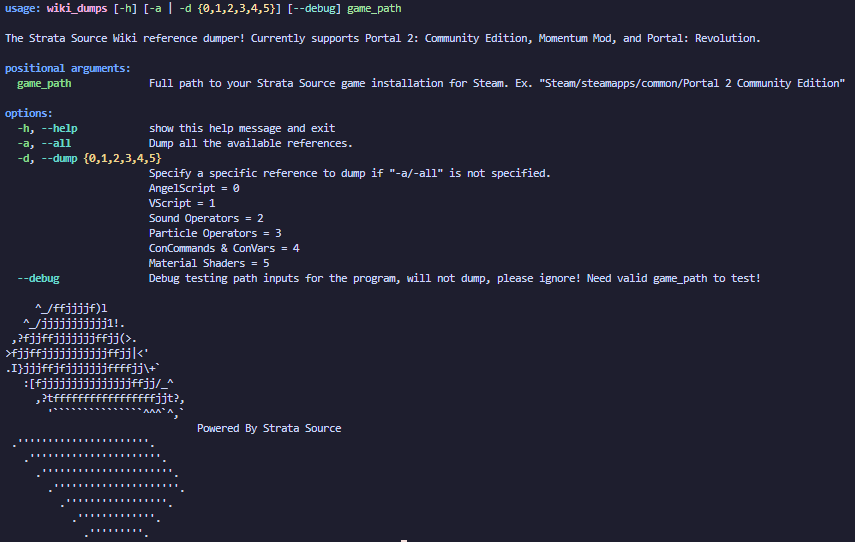
If you wish to get individual dumps, there are several Console commands and methods to take to get certain dumps. Most of these commands should dump to the data folder located in the current game folder (Ex. p2ce/data). It will be specified if otherwise. Those with (WIKI) in the front are dumps used by the Wiki.
There exists a executable in the bin/win64 directory of the Strata game which will provide dumps for various references of the engine. docdump can be used in a terminal with a specifying parameter and filename to get a JSON dump of the specified reference. Running docdump on it's own provides available parameters.
The Dumps
AngelScript
The AngelScript scripting system is setup to dump several different dumps of the registered AngelScript. These are separated by server and client by have matching commands with the exception of the front.
sv/cl_scriptsystem_dump: Dumps a api_reference HTML page which provides a local reference of the registered AngelScript.
(WIKI) sv/cl_scriptsystem_dump_json: Dumps the api_reference JSON file used for the Wiki's AngelScript reference pages. This should be renamed to angelscript_server_p2ce.json or angelscript_client_p2ce.json respectively before replacing the current dumps in the dumps folder.
sv/cl_scriptsystem_dump_lsp: Dumps a as.predefined file used with the AngelScript Language Server Visual Studio Code extension.
There also exists a separate Hammer dump for AngelScript, instead of using the game, Hammer's added Console must be used instead.
scriptsystem_dump: Dumps a api_reference HTML page which provides a local reference of the registered AngelScript for Hammer.
(WIKI) scriptsystem_dump_json: Dumps the api_reference JSON file used for the Wiki's AngelScript reference pages. This should be renamed to angelscript_hammer_p2ce.json before replacing the current dumps in the dumps folder.
scriptsystem_dump_lsp: Dumps a as.predefined file used with the AngelScript Language Server Visual Studio Code extension.
VScript
Like AngelScript, VScript also comes with a server-client model for its dumps. However, as of 02/03/26, there is no difference between the two and the server one should be used for the Wiki.
(WIKI) sv/cl_script_dump_docs: Dumps a vscript_docs.server JSON file used for the Wiki's VScript reference pages. This should be renamed to vscript.json before replacing the current dumps in the dumps folder.
Sound Operators
snd_sos_print_operators (filename-to-dump-to): This ConCommand alone will partially dump all available sound operators to the console, this generally isn't helpful, but adding a file name at the end will instead save the sound operators to a JSON file relative to the game directory (Ex. p2ce).
(WIKI) Using docdump: Run docdump with the parameters sound_ops sound_operators and the program will output all available sound operators to a JSON file for the Wiki to parse.
Particles
cl_particles_dump_json: Dumps a particle_docs JSON file containing particle operators.
(WIKI) Using docdump: Run docdump with the parameters particle_ops materials and the program will output all available material shaders to a JSON file for the Wiki to parse.
ConCommands & ConVars
(WIKI) cvar_dump: Dumps a cvars JSON file containing all registered non-developer ConCommands and ConVars in the engine. This file is used on the Wiki's ConCommand and ConVar reference pages. This file should be renamed to commands_(game).json where (game) is the current game folder (Ex. commands_p2ce.json).
Material Shaders
(WIKI) Using docdump: Run docdump with the parameters shader materials and the program will output all available material shaders to a JSON file for the Wiki to parse.